Install ServersUp for Discord game server alerts
Get notified when your community's favorite game servers go up or down.
Free forever. No subscription.


ServersUp alerts your Discord community when game servers go up or down. The bot is constantly polling game servers in the background, and when something changes, it sends a notification to anybody who has subscribed to that game server.
You do not need to keep refreshing official status pages or wait for maintenance posts that often arrive late. When status changes, the alert appears in the channel your community already watches. New here? Why alerts only fire on change →
Features
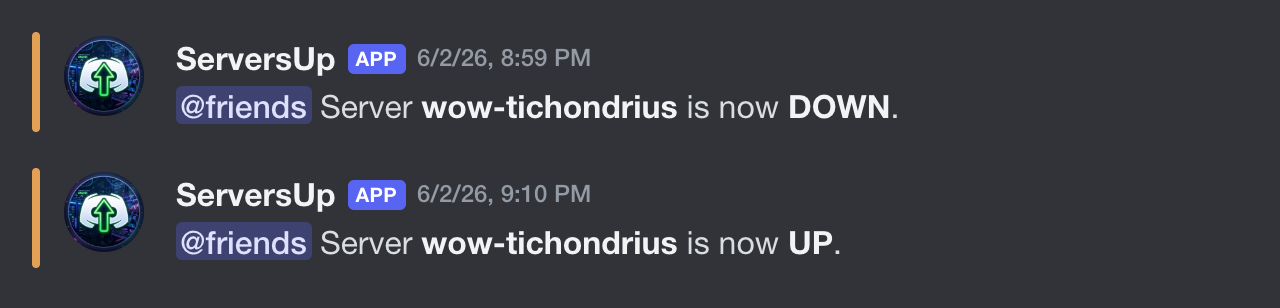
- Notifications within about a minute of a server status change
- Optional role mentions when you subscribe, so the right people get pinged
- Live status board on the homepage - no bot required to check UP/DOWN
How To Set Up The Discord Bot
- Add the bot to your server with the Add Discord bot button above.
- Pick or create a channel for updates. Make sure the bot can send messages and read message history in that channel.
-
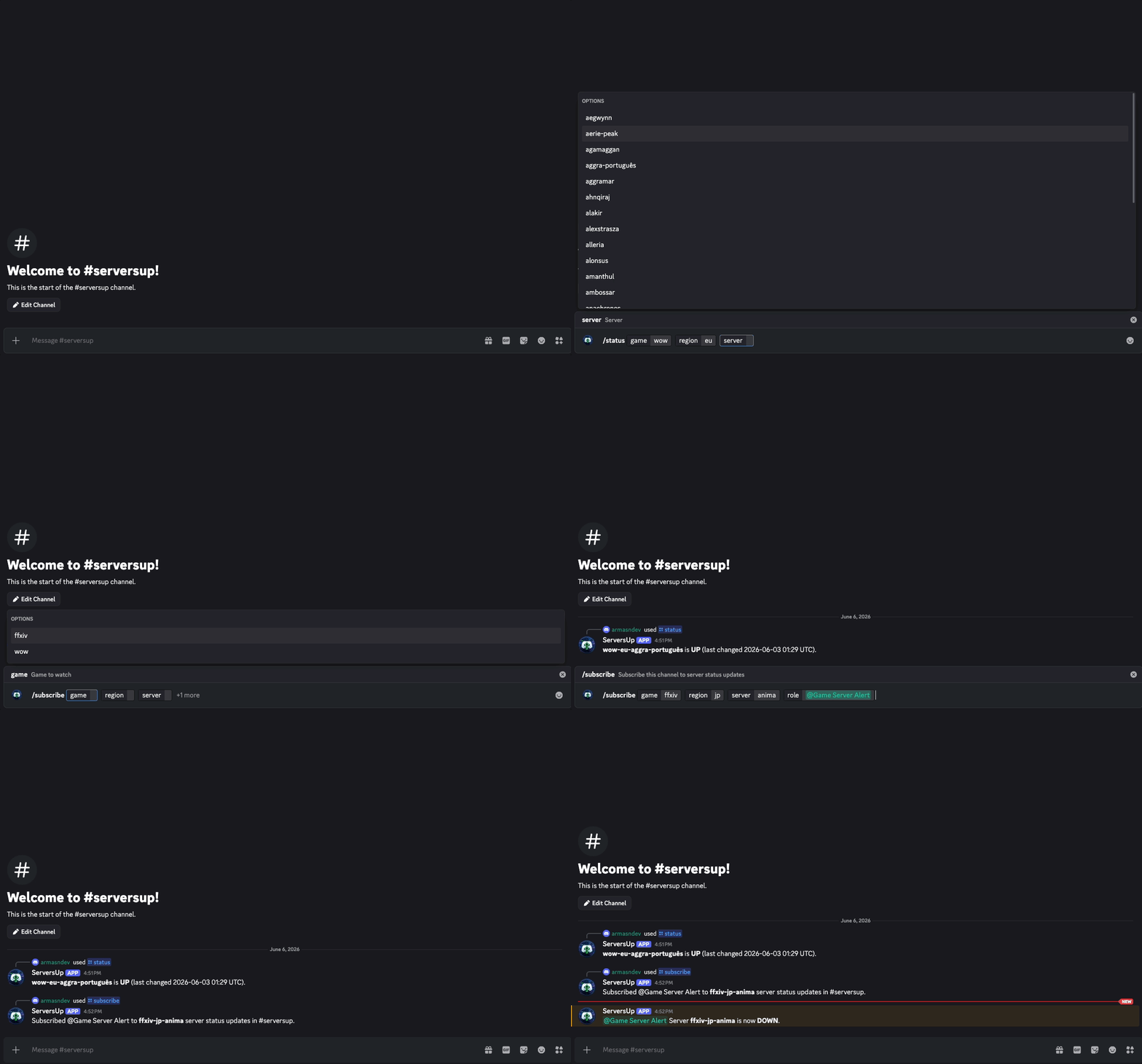
Run
/subscribein that channel and pick game, region, and server. Autocomplete helps you fill each field with valid values. Updates are sent to the channel where you run the command.
Set Up With A Webhook
Prefer a webhook? No bot, no permissions needed, no signup. Webhooks post alerts to any channel you choose, without adding the bot to your server.
- Click Add via webhook above to open the form. You can also reach it from the buttons at the bottom of this page.
- Create a webhook in the channel that should receive alerts (Server Settings → Integrations → Webhooks) and paste its URL into the form.
- Pick the game, region, and server you want to watch, then set an optional role to mention.
- Submit the form. ServersUp posts a test alert to your webhook to confirm it works before saving. Alerts then flow to that channel whenever the server changes status.
Bot Commands
/subscribe: add a subscription (Manage Channels or Administrator required)/unsubscribe: remove one (Manage Channels or Administrator required)/subscriptions: list by channel/status: check UP/DOWN now/regions,/servers, and/games: browse the catalog/help: explain each command and common pitfalls
Supported games
Select a game and region, then search.
Upcoming changes
- Subscribe and get alerts via DM, outside your Discord server
- More games, including Old School RuneScape, other Blizzard titles, and popular MOBAs
- Added Live status homepage (no Discord bot required) 2026-07-13
- Added Multi-region WoW support 2026-05-26
- Added Final Fantasy XIV Online support 2026-06-04
Changelog
v1.5 2026-08-10
Subscribe to ALL servers: pick a game + region and choose ALL SERVERS in the webhook
form (or use /subscribe with a game + region in Discord) to watch an entire region at once.
You get one alert when every server in that region is down and one when they all come back up - no spam
for individual realms. Works with both webhook subscriptions and the Discord bot.
v1.4 2026-08-09
Webhook subscriptions: get server alerts without adding the bot. Paste a Discord webhook URL, pick a game, region, and server, and ServersUp posts a test alert to confirm before saving. Optional role mention for pings.
v1.3.1 2026-07-13
Website URL: live status and install docs are at
v1.3 2026-07-13
Live status on the website: check World of Warcraft and Final Fantasy XIV UP/DOWN on the homepage without adding the Discord bot. Pick a game and region to browse every listed realm. The page uses the same live data as Discord alerts, so both stay in sync when a realm flips.
v1.2.1 2026-06-19
Faster regional Battle.net polls for World of Warcraft, so UP/DOWN changes can reach Discord sooner.
v1.2 2026-06-04
FFXIV support. Regions: na, eu, jp, oce. Example label: ffxiv-na-gilgamesh.
v1.1 2026-05-26
Multi-region WoW. Required region on subscribe, status, and servers.
v1.0.3 2026-05-15
/subscribe and /unsubscribe now require you to have Manage Channels or
Administrator in the server.
v1.0.2 2026-05-15
/servers and /status. Rate limits on status.
v1.0.1 2026-05-13
/games command.
v1.0.0 2026-05-07
Initial release.
FAQ
Is ServersUp free?
Yes. ServersUp is free forever. There is no subscription, no per-alert fee, and no signup to use the live status board.
Do I need Discord just to check server status?
No. The live status board shows World of Warcraft and Final Fantasy XIV realms without installing anything. Discord is only needed when you want channel alerts.
Will the bot spam my Discord channel?
No. Alerts fire only when a realm you subscribed to actually changes status. You pick the games and realms, so the channel stays quiet until something you configured changes. More on alerts without spam.
What does subscribing to ALL servers mean?
Watching ALL servers covers every realm in a region you pick, like all US realms. You get one alert when every server in that scope is down, and one when they all come back up - instead of a message for each individual realm. It is a good fit for region-wide outages or maintenance.
Which games does ServersUp support?
World of Warcraft and Final Fantasy XIV today, across the regions listed above and on the live board. More games may be added later.
Who can run /subscribe?
You need Manage Channels or Administrator in the Discord server to run
/subscribe and /unsubscribe. Anyone in the channel can still see the alerts
once a subscription exists.
How is a webhook subscription different from the bot?
The bot posts alerts with the bot's name and needs permissions in your server. A webhook posts under its own name, needs no bot and no permissions, and cannot run any commands. Both deliver the same alerts on status changes; they are just two ways to receive them.
Why does the form send a test alert?
Before saving, ServersUp posts one test alert to your webhook. That confirms the URL works, proves you control the channel it points to, and avoids subscribing a stale or broken webhook.
Can I subscribe to the same server on both bot and webhook?
Yes. Bot subscriptions and webhook subscriptions are separate, so you can have alerts in multiple channels or use both methods at once. Each webhook can only subscribe to a given server once.
What if I delete the webhook after subscribing?
Alerts to a deleted webhook fail silently; ServersUp stops retrying them and no longer tries to deliver to that webhook. Delete the subscription or create the webhook again if you want alerts back.
Free forever. Alerts only when a realm you pick changes status.
Feedback
Have a suggestion, bug report, or question? Email me at armasndev@proton.me.
Support my work
Thanks for checking out ServersUp. I'm Armand. I build and host this in my spare time. Donations are never required, but they're genuinely appreciated and go toward infrastructure costs to keep the bot and this site running.