Good game server status alerts in Discord are simple: your community gets one notification when the status of a realm you picked actually changes, not a stream of noise. Most bots fail that test, so people mute them and go back to refreshing status pages. Here is how to get clean downtime notifications instead.
Why do spammy game status bots get muted?
Guild and raid Discords care when a game server comes back. People still refresh official status pages, or they sit there hammering login until it works, or they add a bot that pings too often. When every rumor or every realm becomes a notification, the channel gets muted and the status feed stops being useful. ServersUp solves all three of these problems. A good alert removes that busywork. You get pinged the moment the server is back, so you can log in when it actually matters instead of babysitting a queue.
Official pages stay the source of record (for example Blizzard realm status). The problem is not finding status once. It is getting a clean signal in Discord without babysitting the page.
What does “at your convenience and configuration” mean?
ServersUp exists so communities get a free alert when it matters, on their terms. You pick and choose which games and realms to follow. Alerts go where you configure them. You are not subscribed to every realm, every poll, or someone else’s idea of what is important.
Check the live server status board anytime without Discord. When you want channel alerts, install the bot and wire only what your group needs. It stays free forever.
Patch days, maintenance, and unplanned downtime
Scheduled maintenance and surprise outages both derail raid nights and static groups. Plenty of people go looking for a paid app or subscription that sends instant downtime notifications, but a service that blasts every event for every server just recreates the noise problem, now with a bill attached.
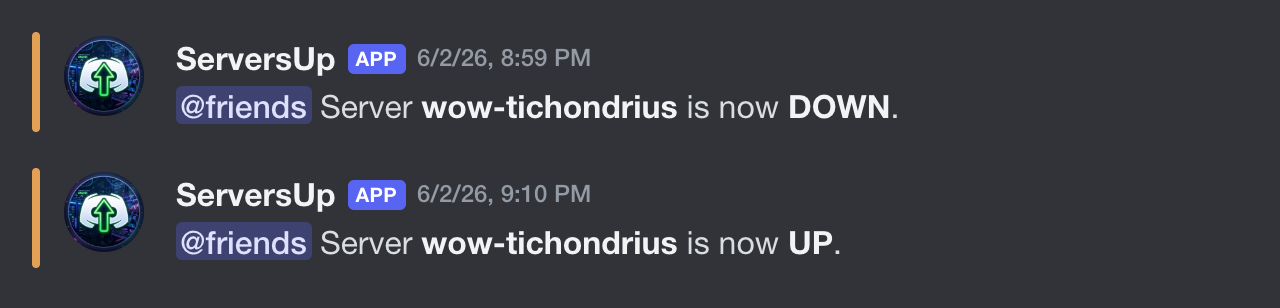
ServersUp takes the opposite approach, and it is free. It polls each supported realm and only fires when its status changes, so your channel hears when maintenance starts and again the moment the server comes back up, with no minute-by-minute pinging in between. You watch live server status today (more games as the board grows), you choose which realms, and alerts land in Discord where your group already coordinates. It works as a lightweight game server monitor for Discord, with no per-alert subscription and no plan to charge later.
Tired of refreshing status pages? ServersUp can post a free alert when a realm you watch goes up or down. Set it up in about a minute.